Large Clipboard History
By default, save up to 20 recent items to your clipboard. Optionally, adjust your configurations with a large number of options.
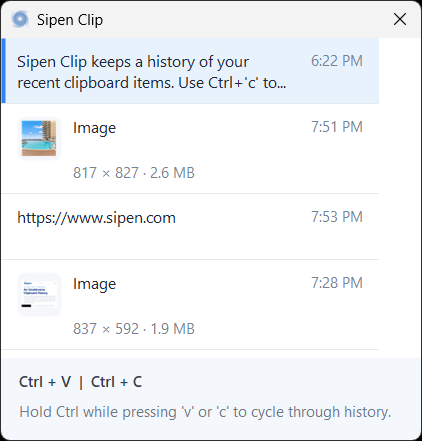
Sipen Clip is free clipboard management software for Windows that keeps a history of your recently copied clipboard items. Use Ctrl+'c' to copy items to your clipboard. Then, press Ctrl+'v' to paste as usual. Or, hold the Ctrl key while pressing 'v' repeatedly to cycle through items. When you are ready to paste, release the Ctrl key, and the clipboard items are pasted.
Copy all items from one screen at once without the need to jump back and forth between screens or applications!
By default, save up to 20 recent items to your clipboard. Optionally, adjust your configurations with a large number of options.
Pasting content is as easy as pressing Ctrl+'v'. No need to change your habits. Hold Ctrl while pressing 'v' to cycle through the options.
When choosing to paste, a preview window shows text snippets, file lists, resized images, and associated metadata.
Press Ctrl + C to copy highlighted text, files, or other content.
Keep the Ctrl key pressed and tap V to bring up the clipboard manager. You can continue holding Ctrl and tapping the V or C keys to cycle through the clipboard history.
When the preview window displays the target object, release the Ctrl key, and that item is pasted.
This application requires the Windows .NET 10 Runtime. If you have the latest Windows updates, this should be in place, but you may need to install this for older versions of Windows. This program is free for personal or commercial use but cannot be resold.